Most programs revolve around managing data, and the container you choose often shapes performance more than the algorithm you run.
In this lab we will tour cornerstones of the C++ Standard Template Library: vector, list, queue, and map. We will compare how each container grows, accesses, and orders its elements. Lastly, we will understand the common tool for traversing all containers: iterators.
§1 Vector #
A std::vector in C++ is a dynamic array that can grow in size as needed. It offers several member functions and operators to manipulate data.
Vectors are template objects, meaning that you need to specify the type of data that is contained in the vector up front. A vector can be declared to hold any type of data, including user-defined data types such as structs.
vector<string> phrases;
Important Vector Member Functions:
| Method | Description |
|---|---|
push_back(value) | Adds an element at the end of the vector. |
insert(iterator position, value) | Inserts an element at the given position. |
pop_back() | Removes the last element. |
erase(iterator position) | Removes an element from the given position. |
size() | Returns the number of elements in the vector. |
empty() | Returns true if the vector is empty. |
clear() | Removes all elements from the vector. |
at(index) | Accesses the element at the given index with bounds checking. |
capacity() | Returns the number of elements that can be stored without reallocating memory. |
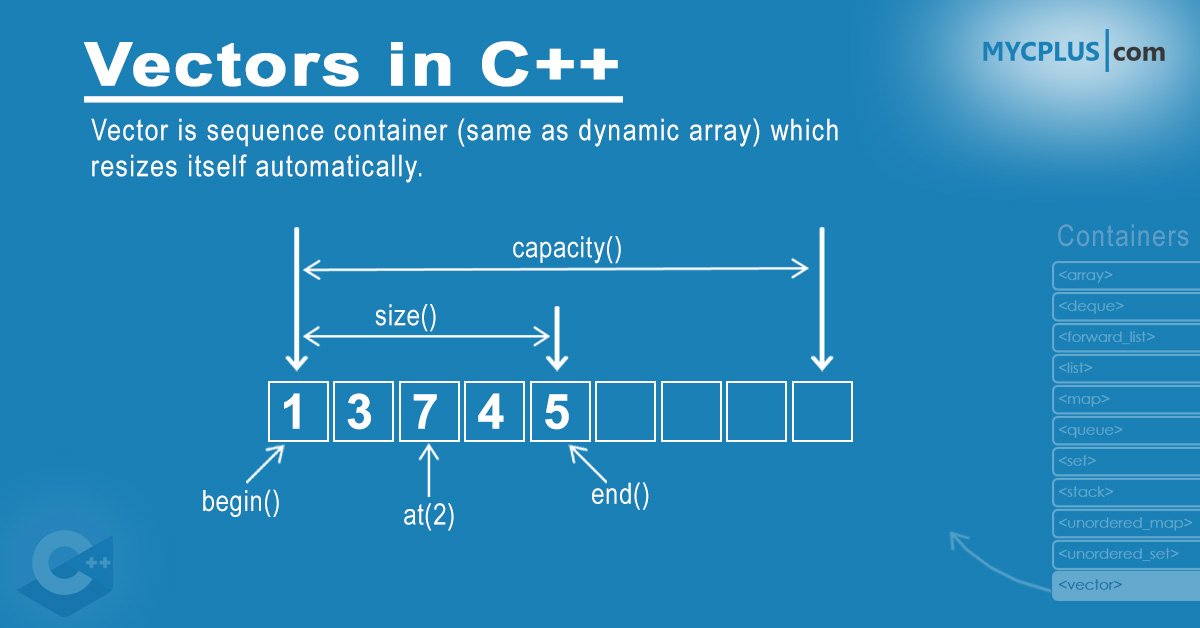
Source: mycplus.com
Example of Using a Vector:
#include <iostream>
#include <vector>  // import the vector library

int main() {
  std::vector<int> numbers; // declare a vector that holds integers

  // Add some elements
  numbers.push_back(10);
  numbers.push_back(20);
  numbers.push_back(30);

  // Access first element using .at(0), similar to accessing an array with arr[0]
  std::cout << "First element: " << numbers.at(0) << std::endl;

  // Delete last element from the vector
  numbers.pop_back();

  // Insert and erase elements in the middle of the vector
  // these methods use an iterator, which will be covered later in this lab
  numbers.insert(numbers.begin(), 5); // add a 5 at the front of the vector
  numbers.erase(numbers.begin() + 1); // delete the second item

  // Get the number of elements in the vector
  std::cout << "Size of vector: " << numbers.size() << std::endl; // Size of vector: 3
}
Vector Operators:
- Access (
[]): You can access elements with[]just like an array, but without bounds checking.- Prefer
[]when you can guarantee you will not access an out of bounds index, use.at()when you need a bounds check.
- Prefer
- Assignment (
=): You can assign one vector to another.vector2 = vector1; - Equality (
==) (!=): Compares two vectors for equality/inequality. - Relational comparison (
<) (>) (<=) (>=): Lexicographically compare vectors.
std::vector<int> vec1 = {11, 12, 13};
std::vector<int> vec2;
vec2 = vec1;  // vec2 is now a copy of vec1
std::cout << vec2[1]; // prints:  "12"
§1.1 Vector Comparison #
When comparing vectors, the items are compared element by element, similar to how strings are compared. For vector1 > vector2, the comparison proceeds as follows:
- The first elements of both vectors are compared.
- If
vector1[0] > vector2[0], thenvector1 > vector2istrue. - If
vector1[0] < vector2[0], thenvector1 > vector2isfalse. - If
vector1[0] == vector2[0], the comparison moves on to the next element.
- If
- This process continues element by element until a difference is found.
- If all compared elements are equal, but one vector is longer, the longer vector is considered greater. For example, if
vector1has more elements thanvector2, and all compared elements are equal, thenvector1 > vector2istrue.
Example:
#include <iostream>
#include <vector>

int main() {
  std::vector<int> vector1 = {1, 2, 3};
  std::vector<int> vector2 = {1, 2, 2};

  if (vector1 > vector2) {
    std::cout << "vector1 is greater than vector2" << std::endl;
  } else {
    std::cout << "vector1 is not greater than vector2" << std::endl;
  }
}
In this example, vector1 > vector2 will be true because the third element of vector1 (3) is greater than the third element of vector2 (2).
§1.2 Vector Trade-Offs #
Pros:
- Dynamically resize as elements are added. This allows flexibility when you don’t know the number of elements in advance.
- Elements are stored in contiguous memory blocks. This leads to faster iteration and immediate random access of elements at any position in the vector.
- You can pre-allocate memory using the
reserve()function, minimizing the number of reallocations and copies when adding elements, improving performance for known large datasets.
Cons:
- Every time the vector grows beyond its capacity, it must allocate new memory and copy/move existing elements, which can incur a significant performance cost, especially in large vectors.
- Inserting or deleting elements in the middle of a vector is inefficient, as all subsequent elements must all be shifted. This makes
std::vectorless suitable for applications that require frequent insertions or deletions at arbitrary positions.
§1.3 Vector Documentation #
Full documentation on std::vector:
§2 List #
An std::list is a doubly linked list that allows fast insertion and deletion at both ends. Unlike vectors, std::list does not provide arbitrary access to items in the middle of the list.
A C++ list is implemented as a “chain” of individual “nodes.” Each node contains two main components: the data being stored, and a pointer to the next node in the chain. In a doubly linked list, like std::list, each node also holds a pointer to the previous node, allowing traversal in both directions. This structure allows for efficient insertions and deletions at any point in the list but requires sequential access to reach specific elements.
Like vectors, Lists are also template objects, meaning that you need to specify the type of data that is contained in the list up front. A list can be declared to hold any type of data, including user-defined data types such as structs.
list<string> phrases;
Important list Member Functions
| Method | Description |
|---|---|
push_back(value) | Adds an element at the end of the list. |
push_front(value) | Adds an element at the beginning. |
front() | Returns the first element. |
back() | Returns the last element. |
pop_back() | Deletes the last element. |
pop_front() | Deletes the first element. |
size() | Returns the number of elements in the list. |
insert(iterator position, value) | Inserts an element at the specified position. |
erase(iterator position) | Removes the element at the specified position. |
clear() | Removes all elements from the list. |
empty() | Checks if the list is empty. |
Notice there is no function to immediately access elements in the middle of the list. This can only be accomplished by using an iterator.
Example of Using a List:
#include <iostream>
#include <list>

int main() {
  std::list<int> numbers; // declare a list that holds integers

  // Add elements to the list
  numbers.push_back(10);
  numbers.push_back(20);
  numbers.push_front(5); // Add at the front of the list
  // list contents: 5, 10, 20

  // Print first and last item in list
  std::cout << "First item: " << numbers.front() << std::endl; // First item: 5
  std::cout << "Last item: " << numbers.back() << std::endl; // Last item: 20

  // Delete the last element
  numbers.pop_back();

  // Display the size of the list
  std::cout << "Size of list: " << numbers.size() << std::endl; // Size of list: 2

  // list iterators can only be incremented by 1 at a time
  numbers.insert(numbers.begin()++, 55);  // Insert 55 as the second element
}
List Operators:
- Assignment (
=): Assigns one list to another. - Equality (
==) (!=): Compares lists for equality/inequality. - Relational comparison (
<) (>) (<=) (>=): Lexicographically compares two lists.
§2.1 List Comparison #
List comparison works in the same way as vector and string comparisons, in that each element is compared one at a time.
Equality (==):
- Two lists are considered equal if they have the same size and all elements at corresponding positions are equal.
- If any element differs, the lists are not equal.
Example:
std::list<int> list1 = {1, 2, 3};
std::list<int> list2 = {1, 2, 3};
if (list1 == list2) {
  std::cout << "Lists are equal\n";
}
In this example, list1 == list2 will be true because all elements are equivalent.
§2.2 List Trade-Offs #
Pros:
- Inserting or deleting at any position in the list is always fast, provided you have an iterator or reference to the element.
- Lists avoid the time-consuming memory reallocations that occur with vectors when adding new items.
Cons:
- Random access is not supported; to reach a specific element, you must traverse the list sequentially, unlike vectors that provide direct access to any element.
- Iterating over a list is slower than a vector because of poor cache performance and the need to follow (or iterate) pointers between nodes.
§2.3 List Documentation #
Full documentation on std::list:
§3 Map #
An std::map in C++ is an associative container that stores elements in key-value pairs, where each key is unique. The map maintains its elements in a sorted order based on the keys, and it provides fast lookups, insertions, and deletions.
Maps are also template objects, meaning you need to specify the types of both the keys and values. Maps can be declared to hold any combination of data types, including user-defined types for both the key and value.
std::map<int, std::string> students;
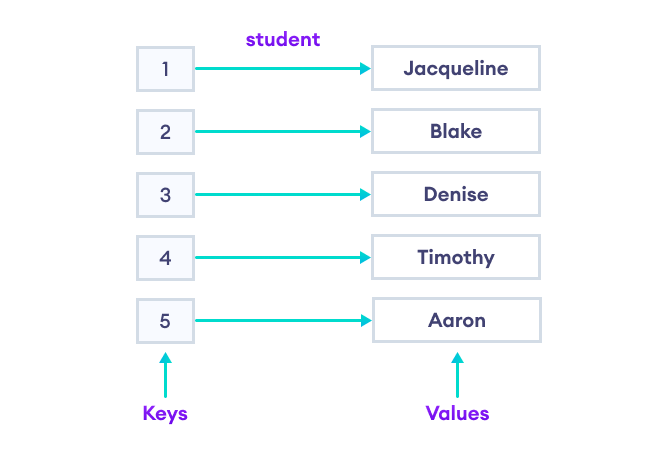
Source: programiz.com
Important Map Member Functions:
| Method | Description |
|---|---|
insert(pair{key, value}) | Inserts a key-value pair into the map. |
erase(key) | Removes the element with the specified key. |
find(key) | Returns an iterator to the element with the specified key, or map.end() if the key is not found. |
at(key) | Returns the value associated with the specified key. Throws an exception if the key is not found. |
operator[key] | Accesses the value associated with the key. If the key does not exist, a new key-value pair is created. myMap[123] = "name" |
size() | Returns the number of elements in the map. |
empty() | Returns true if the map is empty. |
clear() | Removes all elements from the map. |
Example of Using a Map:
#include <iostream>
#include <map>  // import the map library

int main() {
  std::map<int, std::string> employeeNames;

  // Add some elements
  employeeNames[101] = "Alice";
  employeeNames[123] = "Bob";
  employeeNames[103] = "Charlie";

  // Access element using key
  std::cout << "Employee 101: " << employeeNames.at(101) << std::endl;

  // Remove an element
  employeeNames.erase(103);

  // Insert using the insert function
  employeeNames.insert({104, "David"});

  // Check if a key exists
  if (employeeNames.find(105) == employeeNames.end()) {
    std::cout << "Employee 105 not found." << std::endl;
  }

  // Get the number of elements in the map
  std::cout << "Number of employees: " << employeeNames.size() << std::endl;
}
Map Operators:
- Access (
[]): You can access values with the key using[], but if the key does not exist, a new key-value pair will be inserted with a default-constructed value. (use.at()to avoid key creation) - Assignment (
=): You can assign one map to another.map2 = map1; - Equality (
==) (!=): Compares two maps for equality/inequality.
std::map<int, std::string> map1 = {{101, "Alice"}, {102, "Bob"}};
std::map<int, std::string> map2;
map2 = map1;  // map2 is now a copy of map1
std::cout << map2[102]; // prints: "Bob"
§3.1 Map Comparison #
Maps can be compared using relational operators, which compare the keys and values lexicographically. For map1 > map2, the comparison proceeds as follows:
- The first keys in both maps are compared.
- If
map1.first > map2.first, thenmap1 > map2istrue. - If
map1.first < map2.first, thenmap1 > map2isfalse. - If the first keys are equal, the comparison moves on to the values.
- If
- This process continues key-value pair by key-value pair until a difference is found.
- If all compared elements are equal, but one map has more elements, the larger map is considered greater.
Map comparisons work in the same way as list and vector and string comparisons, in that each element is compared one at a time.
Equality (==):
- Two maps are considered equal if they have the same size and all values at corresponding keys are equal.
Example:
#include <iostream>
#include <map>

int main() {
  // Create two maps with different key-value pairs
  std::map<int, std::string> map1 = {{1, "Alice"}, {2, "Bob"}, {3, "Charlie"}};
  std::map<int, std::string> map2 = {{1, "Alice"}, {2, "Bob"}, {3, "Dave"}};

  // Compare map1 and map2 for equality
  if (map1 == map2) {
    std::cout << "map1 is equal to map2" << std::endl;
  } else {
    std::cout << "map1 is not equal to map2" << std::endl;
  }
  // since the two maps are not identical, this will print: map1 is not equal to map2
}
In this example, map1 == map2 will be false because the third value of map1 (“Charlie”) is different than the third value of map2 (“Dave”).
§3.2 Map Trade-Offs #
Pros:
- Maps provide relatively fast access to elements based on keys, offering logarithmic time complexity for search, insert, and delete operations.
- Maps automatically keep elements sorted by the key, making them useful when sorted order is needed.
- Maps allow for unique keys, ensuring no duplicates in the key-value pairs.
Cons:
- Maps use more memory due to internal balancing of the tree structure used to store the elements.
- Inserting and deleting elements can be slower than using other data structures, such as
unordered_map, because maps maintain their sorted property.
§3.3 Map Documentation #
Full documentation on std::map:
§4 When should I use a vector/list/array/map? #
Choosing the right container type in C++ is crucial for writing performant and maintainable code. Each container has its own strengths and is suited for specific use cases. Here’s a general guide to help you decide when to use each container:
Array
Use an Array When:
- You know the size of the collection at compile time and it will not change.
- You need a simple, fixed-size, contiguous block of memory for performance-critical code.
- You do not need advanced functionality like dynamic resizing or inserting elements.
Array Characteristics:
- Constant time (immediate) access to elements.
- No overhead of dynamic memory allocation (unlike vectors).
- Limited functionality compared to other containers.
Vector
Use a Vector When:
- You need a dynamic array that can change size at runtime.
- You need fast access to elements by index.
List
Use a List When:
- You need a sequence container that allows fast insertion and deletion of elements anywhere in the container.
- You do not need random access to elements.
List Characteristics:
- Double-linked list structure with pointers to the previous and next elements, always maintains pointer to beginning and end of the list.
- Efficient insertions and deletions.
- Sequential access, no direct indexing of elements, accessing arbitrary elements requires iterating through the list.
Map
Use a Map When:
- You need to store key-value pairs with unique keys.
- You need to quickly find, add, or remove elements based on a key.
- You need to maintain elements in sorted order based on keys. Map Characteristics:
- Associative container with logarithmic time complexity (slightly slows down as map grows) for insertions, deletions, and lookups.
- Keeps keys sorted.
- Provides unique keys, ensuring that each key is associated with only one value.
§5 Iterators #
You have seen iterators mentioned several times now. Iterators are special objects that point to elements in a container, they are used to traverse through the list of elements. Most STL containers (including vector, list, and map) support iterators.
Iterators act like a pointer that provides access to the elements of the container one at a time, while abstracting away the details of the underlying data structure. Because of this abstraction, iterators are used very similarly across each of the containers that support them.
Iterator Operators:
iterator++: move to the next element in the container.iterator--: move to the previous element in the container.*iterator: dereference the iterator; this retrieves the value at that position in the container.iterator==: compare two iterators for equality.
Example: Using Iterators with Vectors and Lists
#include <iostream>
#include <vector>
#include <list>

int main() {
  std::vector<int> vec = {1, 2, 3, 4, 5};
  std::list<int> lst = {10, 20, 30};

  // Using iterator for vector
    std::vector<int>::iterator it; // declare an iterator for an integer vector

  // it = vec.begin() sets the "it" variable to an iterator pointing to the first element
  // we can move the iterator to the next element with it++
  // and we can get the value of the element by dereferencing the iterator with *it
  for (it = vec.begin(); it != vec.end(); ++it) {
    std::cout << *it << " ";  // Dereference the iterator
  }
  std::cout << std::endl;

  // Using iterator for list
  // it = lit.begin() gets an iterator for the list's first item
  std::list<int>::iterator lit;
  for (lit = lst.begin(); lit != lst.end(); ++lit) {
    std::cout << *lit << " ";
  }
  std::cout << std::endl;
}
Iterators can also be used with more complicated containers such as maps. A map iterator references a pair (the key and the value), so accessing the elements in a map iterator requires using the pointer -> syntax:
iterator->firstiterator->second
Example: Using Iterators with Maps
#include <iostream>
#include <map>

int main() {
  // Create a map of employee IDs and names
  std::map<int, std::string> employeeNames;

  // Insert some elements into the map
  employeeNames[101] = "Alice";
  employeeNames[102] = "Bob";
  employeeNames[103] = "Charlie";
  employeeNames[104] = "David";

  // Declare an iterator for the map
  std::map<int, std::string>::iterator it;

  // Iterate through the map using the iterator
  for (it = employeeNames.begin(); it != employeeNames.end(); ++it) {
    // Access the key and value using the iterator
    // notice we use the pointer -> syntax to access the "first" and "second" elements
    // "first" points to the key, "second" points to the value
    std::cout << "Employee ID: " << it->first << ", Name: " << it->second << std::endl;
  }
}
§6 Further Reading #
The textbook has more information on STL containers and Iterators in
Chapter 17: The Standard Template Library
§7 Questions #
- Explain the difference between
size()andcapacity()in astd::vector.
- Why is it important to be aware of the capacity of a vector when performing operations like
push_back()?
- When would you choose to use a
std::listover astd::vector? Provide at least two scenarios where a list is more suitable.
- What are three ways you can access a value stored at a specific key in a
std::map?
- Provide code (a 1 line snippet is fine) to check if a key exists or not in a
std::map?
- What is the primary difference between an iterator and a pointer in C++?
- Iterators can become “Invalid” in certain cases, such as when adding or deleting items from a vector. What function can you use to avoid invalid iterators when deleting an item from a vector? (Assume you must use an iterator)