This is a new project unrelated to the previous projects.
§1 Task #
In this final project, you will apply many of the concepts and skills you’ve learned throughout this course. Object-oriented programming often operates in the abstract, where “objects” have little connection to real-world entities, this project bridges the gap between theoretical concepts and a tangible system. Your task is to implement a simplified version of the game of chess.
This project challenges you to implement a chess game using object-oriented principles. You will create objects that represent the various components of chess, such as the pieces, board, and the rules governing movement and gameplay. Each object will encapsulate its own state and behavior, allowing you to model the interactions between these objects in a clean and modular way.
If you are not familiar with the game of chess, chess.com provides a helpful cheat sheets on the basic rules and piece moves: https://www.chess.com/terms/cheat-sheet-chess
§2 Info #
In the field of programming, projects are commonly categorized as “Greenfield” or “Brownfield.” These terms refer to the starting conditions of a software project. A “Greenfield” project refers to a new software development initiative that starts from scratch, without any constraints from an existing codebase. A “Brownfield” project involves working with an existing system, which may include modifying, extending, or maintaining an established codebase or infrastructure.
This project is a “Brownfield” project, where you will work with existing code and extend or modify it to accomplish the given tasks.
For this project, I have provided starter code that includes a terminal-based game input handler and renderer. This will allow you to focus on implementing the game logic and rules. You are allowed to make minor modifications the provided rendering code, provided your final implementation adheres to the following requirements:
- You must demonstrate polymorphism in your implementation, ensuring that all game pieces (Pawn, King, Bishop, etc…) inherit from a common parent class.
- Your implementation uses arrow-key based input to control the game.
- The provided starter code handles all input and rendering functionality. While you may extend or modify it, you may NOT rewrite the input handling and rendering code entirely.
I suggest working on easier pieces first, in my opinion, easiest to most difficult:
– King, Knight, Pawn, Rook, Bishop, Queen
§3 Base Requirements #
you will implement all the individual chess pieces as classes with a method to calculate valid moves for each piece.
- Each piece will calculate valid moves from its current position
- Pawns will need to account for their unique move set, including the “first-move” rule
- Pieces may not move through other pieces (other than the knight, which can “jump”)
- Pieces may not attack their own side
- Pieces may not move off the 8x8 chessboard spaces
Requirements which are already handled by the starter code:
- Chess board is rendered to terminal, with a method of differentiating piece selection and potential moves
- Movement through arrow keys is supported
- Pieces can be selected and deselected
- Pieces show potential valid moves to user
- Pieces can be moved and handle updating the state of the game board.
§4 Extra Credit #
You can earn extra credit by implementing further functionality beyond the chess piece move sets.
You may only earn extra credit if all standard piece move sets are implemented correctly.
(you may implement any or all extra credit items listed here regardless of order):
- Game supports “Check” and alerts the user that a king is in “check”.
- Game supports “Checkmate” and alerts the user that the game is over.
- Game supports “Turns” where only one color can move at a time on their turn.
- Valid move sets account for the “check” rule, where a player cannot put their own king at risk of checkmate. https://www.chess.com/terms/check-chess
- Pawns can be “promoted” to a queen if they reach the opposite end of the board. https://www.chess.com/terms/pawn-promotion
§5 Non-Extra Credit #
To limit the scope of this project, the following special rules will not count for extra credit if implemented:
- “Castling”
- Pawn “En Passant”
- Endgame scenarios other than checkmate (including “draw”)
§6 Examples #
Expected starting positions, and a valid move set for a knight and bishop, note how each piece is not able to attack its own team:
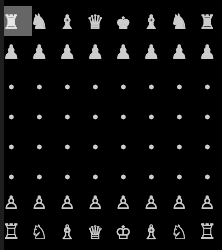
clean start
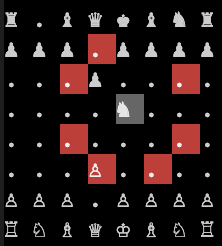
valid knight
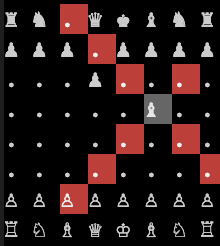
valid bishop
This next image depicts an invalid move set for a bishop, here this bishop can attack own pieces and move through pieces, which are not valid moves:
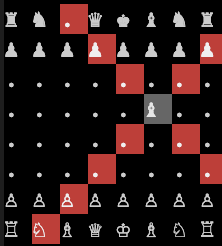
§7 Rubric #
A “correct” implementation of a piece assumes:
- The piece can always move to a valid empty space for its move set
- The piece cannot move through other pieces (with exception for the knight)
- The piece can only attack enemies, not own color pieces
- (
5%) Chess game begins with all pieces in proper starting position. - (
16%)Pawnmove set implemented correctly.- Each pawns first move (and only first move) allows moving 1 or 2 spaces.
- Pawn can only move forward, is blocked by all pieces directly in front of it.
- Pawn “attacks” diagonally, does not attack own pieces.
- (
14%)Rookmove set implemented correctly. - (
16%)Knightmove set implemented correctly.- Can “jump” over other pieces.
- (
14%)Bishopmove set implemented correctly. - (
14%)Kingmove set implemented correctly. - (
10%)Queenmove set implemented correctly. - (
6%) Write up.- (
5%) UML diagram.
- (
Extra Credit:
- (
5%) Game supports “Check” and alerts the user if a king is in “check”. - (
5%) Game supports “Checkmate” and alerts the user that the game is over when a king is attacked. - (
5%) Game supports “Turns” where only one color can move at a time on their turn. - (
5%) Pawns can be “promoted” to a queen if they reach the opposite end of the board. - (
5%) Valid move sets account for the “check” rule, where a player cannot put their own king at risk of checkmate.
Maximum Score: 100% + 25% Extra Credit.
WARNING: You will fail with a 0 if the following two requirements are not met:
- Must demonstrate polymorphism, all chess game pieces inherit from a common parent class.
- Must use arrow-key based input to control the game (this is fully provided as-is in the starter code).
§8 Starter Code #
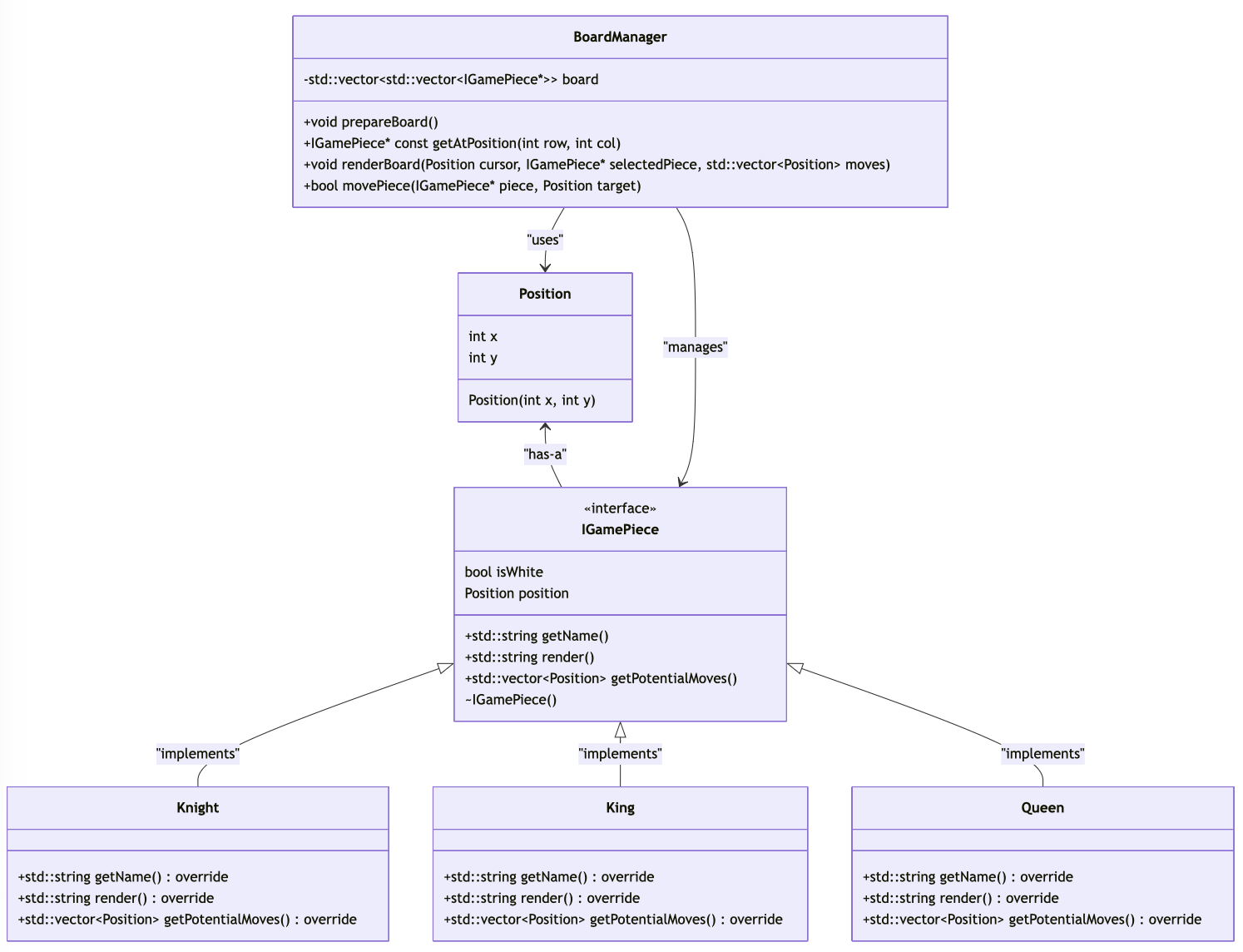
The provided starter code is meant to allow you to focus on implementing the chess pieces. This is a basic implementation of the model-view-controller pattern.
Here is how it works:
- The
main()function implements the control loop for the game, responsible for calling on the renderer and updating the game based on user input via the globalboardManagerobject. boardManageris a global static instance of typeBoardManager, which contains a 2D vector representing the chessboard, namedboard.- The
BoardManagerclass fully implements two methods for rendering and game state:renderBoard()andmovePiece(), you do not need to change these methods. You may want to updaterenderBoard()if you are attempting certain extra credit challenges. - You will need to complete the implementation for
prepareBoard()which is responsible for setting up the game board with initial chess pieces. - There is an extra helper function for accessing a pointer to any piece on the chassboard:
getAtPosition()returns a pointer to aconstobject at any arbitrary position on the board, this may return anullptrif nothing is on the board at that location. - You may add extra helper methods as needed in the
boardManagerclass, such as checking if a position is valid on the board.
- The
Positionis a simple struct to represent anxandycoordinate position on the chess board.IGamePieceis an interface fot all chess pieces to inherit from, it defines the following:isWhiteis a boolean to determine what side the piece belongs to.positionis aPositionobject representing the current position of the piece, this variable should be treated as read-only and will be updated by theboardManagerevery time the board is updated.- The following methods will need to be implemented by every chess piece:
getName()will return a string of the name of the current piece, this is used inmain()for updating the status message.render()will return a string representing the piece, whatever string is placed here will be printed when the piece occupies a space, you may use ascii or unicode here, such as anRor♜to represent arook.getPotentialMoves()is the main method you will need to focus on, this method will return a vector ofPositionobjects which represents the list of valid moves for the current piece. You have access to the parentIGamePieceobjectspositionmember, which can be used to get the current position of the piece, and calculate the valid moves from there.
- An example fictional chess piece is implemented in the starter code
Plusser, this demonstrates the implementation of theIGamePieceand its required methods. - A set of constant strings are provided at teh top of the starter code file, some are used in the renderer to control the terminal output, others may be used in the piece
render()methods to print unicode or ascii chess icons to the terminal.
The terminal-based renderer uses the terminal alt-display to print, which means that a segfault crash will leave your terminal in a broken state. You will still be able to type
resetto reset your terminal, then use the up and down arrows to cycle previous commands and run your program again.
Second note: if you see an “unknown character” icon (
�or□) instead of unicode♜characters, this means your terminal does not support unicode, the visual studio code built-in terminal supports unicode on all operating systems, but if you wish you may use ascii representations for the chess pieces instead of unicode icons.
UML example:
§9 Write Up #
Answer the following questions:
- Explain how your implementation utilizes polymorphism.
- Did you utilize recursion? If yes, how? if not, why not?
- Provide an example from your implementation where you reuse logic and avoid needless code duplication.
- Did you encounter any issues with debugging or runtime errors? How did you resolve them?
- What was the most significant thing you learned while working on this project?
- Tell me about a part of your project that you are proud of, or found a clever solution to a problem you faced.
§10 Submission #
You will submit:
- Your project source code on Github.
- Your write up on canvas, UML diagram should be submitted as part of your write up.
If you are attempting to earn extra credit, mention what you attempted in your write-up.