Most computer science degree programs include an upper-division course focused on this subject, often titled “Algorithm Analysis”. This lab will be a basic introduction to the topic.
When analyzing algorithm performance, a key factor is its scalability as input size increases. For instance, consider a program designed to process a list of items. As the list grows from hundreds to thousands or even millions of elements, it’s essential to assess how execution time changes. In real-world applications, such as rendering graphics, this scaling effect is even more evident. A rendering algorithm (like a shader) processing a 1080p image must handle just over 2 million pixels, whereas rendering a 4K image requires processing about 8.3 million pixels, significantly increasing the computational load.
The formal approach for assessing how an algorithm’s performance changes as input size scales is known as Big O notation. This notation provides a way to describe the upper limit of an algorithm’s growth rate, focusing on its efficiency in terms of time or space as the input size increases. By categorizing algorithms based on their worst-case scenarios, Big O notation helps developers predict and compare the scalability and performance impact of different algorithms across varying input sizes.
§1 What is Big O Notation? #
Big O Notation is a mathematical concept used to describe the performance or complexity of an algorithm in terms of the input size,
n. It provides an upper bound on the time or space complexity, allowing developers to understand how an algorithm will scale as the input size grows.
Big O Notation focuses on the worst-case scenario, providing a way to evaluate the efficiency of different algorithms.
Common Big O Complexities:
O(1)- Constant Time: Accessing a specific element in an array.O(log n)- Logarithmic Time: Iterating through all elements in a single loop.O(n)- Linear Time: Nested loops iterating over elements.O(n log n)- Linearithmic Time: Binary search.O(n^2)- Quadratic Time: Merge sort.O(2^n)- Exponential Time: Fibonacci calculation using recursion.O(n!)- Factorial Time: Generating all permutations.
These can be visualized in the image below:
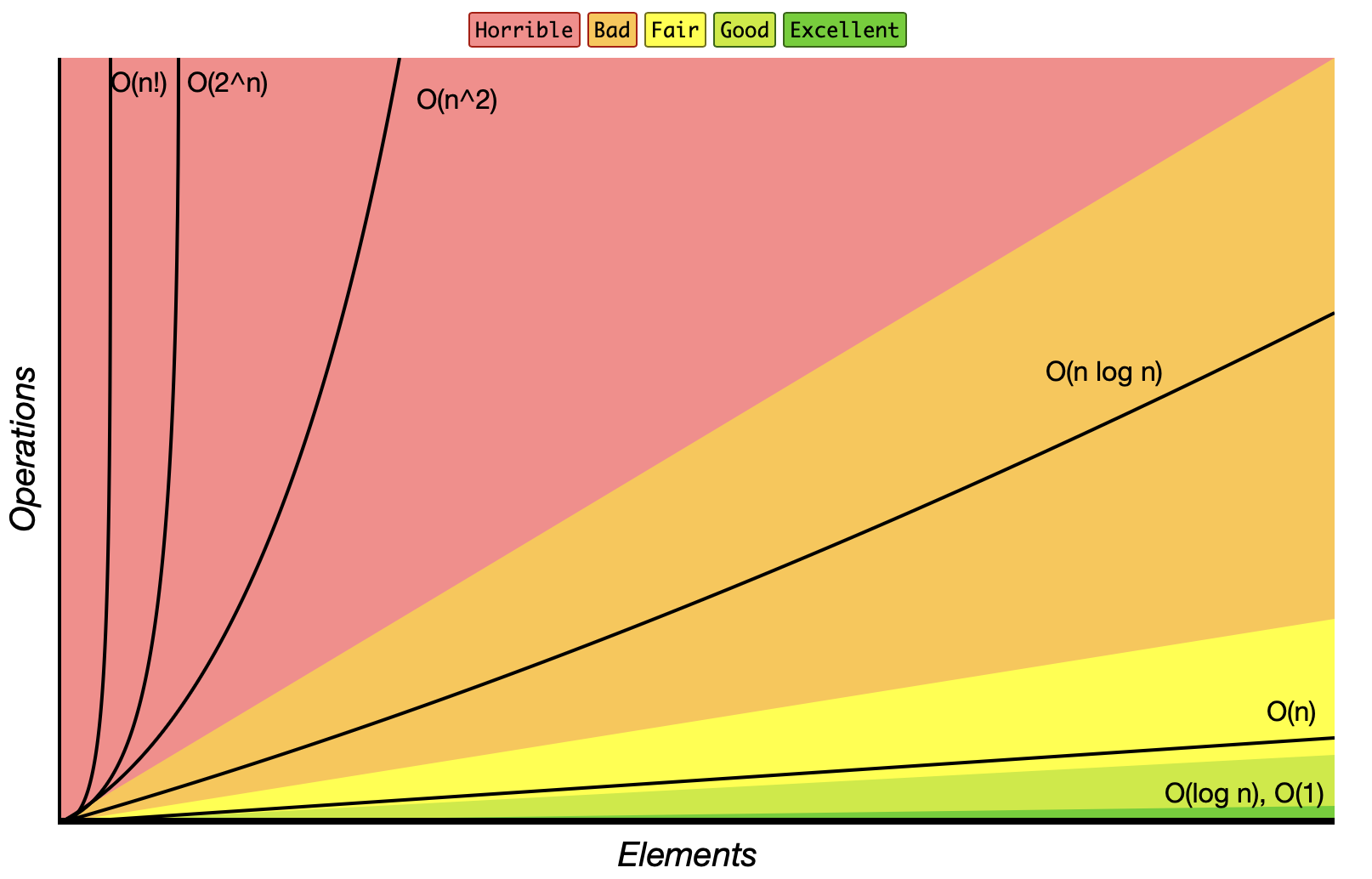
Sourced from www.bigocheatsheet.com
§2 Big O Examples #
O(1) - Constant Time
An algorithm has O(1) complexity if it takes a constant (read: consistent) amount of time, regardless of the input size.
void printFirstElement(const std::vector<int>& arr) {
  if (!arr.empty()) {
    std::cout << arr[0] << std::endl; // this always takes the same amount of time to run
  }
}
Explanation: Here, printFirstElement() accesses the first element of the vector arr, which takes constant time, O(1), since accessing a single element by index is constant in C++ vectors.
Big O notation does not consider how long a function takes to run, it only cares about increase in runtime when the number of inputs grows.
For example, both of these functions are considered O(1) complexity:
void printFirstElementFast(const std::vector<int>& arr) {
  if (!arr.empty()) {
    printQuickly(arr[0]); // takes a few microseconds
  }
}
void printFirstElementSlow(const std::vector<int>& arr) {
  if (!arr.empty()) {
    printSlowly(arr[0]); // takes an entire minute
  }
}
Explanation: Both printFirstElementFast() and printFirstElementSlow() are constant time O(1) algorithms, even though the second one takes significantly longer to execute. This is because they each take the same amount of time to execute regardless of the size of the input array. The amount of time for the functions to complete does not change no matter how large the input array is.
O(log n) - Logarithmic Time
An algorithm has O(log n) complexity if it halves the search space with each step, often seen in binary search.
int binarySearch(const std::vector<int>& arr, int target) {
  int left = 0, right = arr.size() - 1;
  while (left <= right) {
    int mid = left + (right - left) / 2;
    if (arr[mid] == target) return mid;
    else if (arr[mid] < target) left = mid + 1;
    else right = mid - 1;
  }
  return -1;
}
Explanation: The binarySearch() function has O(log n) complexity because it halves the search space with each iteration. This is typical for divide-and-conquer algorithms.
(Optional) More on binary search algorithms if interested: https://youtu.be/eVuPCG5eIr4
O(n) - Linear Time
An algorithm has O(n) complexity if it has to look at every element in the input once.
int findSum(const std::vector<int>& arr) {
    int sum = 0;
    for (int num : arr) { // iterates through entire list
        sum += num;
    }
    return sum;
}
Explanation: The findSum() function has O(n) complexity because it iterates over each element in arr once, making the time increase directly proportional to the input size n.
Big O notation does not care about additive complexity, only multiplicative complexity.
For example, both of these functions are considered O(n) complexity:
int findSum(const std::vector<int>& arr) {
  int sum = 0;
  for (int num : arr) { // iterates through entire list O(n)
    sum += num;
  }
  return sum;
}
int findSumTwice(const std::vector<int>& arr) {
  int sum = 0;
  for (int num : arr) { // iterates through entire list O(n)
    sum += num;
  }
  for (int num : arr) { // iterates through entire list again O(n)
    sum += num;
  }
  return sum;
}
O(n+n) => O(n), Big O notation simplifies n+n to just n
Explanation: Both findSum() and findSumTwice() are both considered linear time O(n) algorithms, even though the second one iterates over the list twice. This is because Big O complexity only cares about multiplicative increases, not additive increases. The amount of time for each function to complete as the input array increases would remain linear over time (though the second one will take a bit longer overall).
O(n log n) - Linearithmic Time
Sorting algorithms often have O(n log n) complexity, such as the Merge Sort or Quick Sort algorithms.
void mergeSort(std::vector<int>& arr, int left, int right) {
  if (left < right) {
    int mid = left + (right - left) / 2;
    mergeSort(arr, left, mid);
    merge(arr, mid + 1, right);
    merge(arr, left, mid, right);
  }
}
Explanation: The mergeSort() function has O(n log n) complexity due to repeatedly splitting the array (O(log n)) and merging each part (O(n)). Most efficient sorting algorithms operate at this complexity.
(Optional) More on sorting algorithms if interested:
- Quicksort: https://youtu.be/4VqmGXwpLqc
- Merge Sort: https://youtu.be/Hoixgm4-P4M
O(n^2) - Quadratic Time
Algorithms with nested loops often have O(n^2) complexity, where the time grows quadratically as the input size increases.
void printPairs(const std::vector<int>& arr) {
  for (size_t i = 0; i < arr.size(); ++i) { // one for loop would be O(n)
    for (size_t j = 0; j < arr.size(); ++j) { //nested loop becomes O(n*n) -> O(n^2)
      std::cout << "(" << arr[i] << ", " << arr[j] << ")\n";
    }
  }
}
Explanation: The printPairs() function has O(n^2) complexity because it has two nested loops, each iterating over the input size n. For each element in the outer loop, it iterates over the entire array in the inner loop again, effectively performing n*n => n^2 operations.
O(2^n) - Exponential Time
Algorithms that solve problems by exploring all subsets of a set can have O(2^n) complexity, which grows extremely fast.
int fibonacci(int n) {
  if (n <= 1)
    return n;
  return fibonacci(n - 1) + fibonacci(n - 2); // recursive functions can easily become O(2^n)
}
Explanation: The recursive fibonacci() function has O(2^n) complexity because each call branches into two more calls, resulting in an exponential growth in the number of recursive function calls. This is highly inefficient for large inputs.
§3 Calculating Time Complexity #
Analyzing the time complexity of an algorithm often involves counting the number of basic operations (like comparisons, assignments, or arithmetic operations) that the algorithm performs relative to the size of the input n. Here are some general steps for manually determining an algorithm’s time complexity:
- Identify Loops: Check for any loops in the code, as each iteration may contribute to the time complexity. For instance:
- A single loop over an array of size
ncontributesO(n). - Nested loops, where each loop iterates
ntimes, contributeO(n^2).
- A single loop over an array of size
- Look at Recursive Calls: For recursive functions, determine how many recursive calls are made and how the input size reduces at each step.
- If each recursive call halves the input (e.g., in binary search), the time complexity is
O(log n). - If each call branches into two, as with the simple Fibonacci example, it often results in
O(2^n)complexity.
- If each recursive call halves the input (e.g., in binary search), the time complexity is
- Break Down Complex Functions: Functions with multiple parts, such as sorting then searching, can have different complexities in each part. For example, sorting an array is
O(n log n), and a subsequent linear search isO(n). In this case, the overall complexity is determined by the highest term, which would beO(n log n). - Drop Constants and Lower-Order Terms: Big O notation simplifies expressions by ignoring constants and non-dominant terms. If an algorithm has
O(n^2 + n)complexity, we simplify it toO(n^2)because, as n grows, then^2term dominates.
Example Analysis: Let’s analyze a sample function to determine its time complexity.
void exampleFunction(const std::vector<int>& arr) {
  int sum = 0;
  for (int num : arr) {   // Loop over n elements, contributing O(n)
    sum += num;
  }
  // separate loops will be regarded as 'additive' in Big O notation
  for (size_t i = 0; i < arr.size(); ++i) { // Another loop over n elements, contributing O(n)
    for (size_t j = i + 1; j < arr.size(); ++j) { // Nested loop contributing O(n*n)
      if (arr[i] < arr[j]) {  // Constant time operations within a loop O(n*n*1)
        std::cout << arr[i] << ", " << arr[j] << std::endl;
      }
    }
  }
}
Simplify:
Drop lower order terms:O(n+n*n*1)O(n+n^2)O(n^2)
Explanation:
- First Loop: The first for loop iterates over each element of
arr, contributingO(n). - Nested Loops: The second set of loops is nested. For each element in the outer loop, the inner loop runs
n - i - 1times, resulting in approximatelyO(n^2)complexity. Combining Terms: The time complexity of this function isO(n) + O(n^2). We simplify it toO(n^2), asO(n^2)dominatesO(n)for large n.
By practicing these steps, you’ll build confidence in determining the time complexity of various algorithms and in recognizing which approach best suits different programming scenarios.
§4 Further Reading #
- Textbook Section 9.6: Introduction to Analysis of Algorithms
- Big O tutorial: https://youtu.be/__vX2sjlpXU?t=155
- Long Big O tutorial with lots of examples: https://youtu.be/D6xkbGLQesk
§5 Assignment #
You will find the time complexity of a series of code samples.
You only need to provide the correct time complexity such as O(n) to get full credit.
To earn partial credit or receive guidance in case you are wrong: you need to show work.
- -
void function1(const int arr[], int size) {
  for (int i = 0; i < size; ++i) {
    for (int j = 0; j < size; ++j) {
      std::cout << "(" << arr[i] << ", " << arr[j] << ")" << std::endl;
    }
  }
}
- -
void function2(const int arr[], int size) {
  for (int i = 0; i < size; ++i) {
    std::cout << arr[i] << " ";
  }
}
- -
void function3(const int arr[], int size) {
  for (int i = 0; i < size; ++i) {
    std::cout << arr[i] << " ";
  }

  for (int i = 0; i < size; ++i) {
    std::cout << arr[i] << " ";
  }
}
- -
void function4(const int arr[], int size) {
  for (int i = 1; i < size; ++i) {
    for (int j = 1; j < size; ++j) {
      std::cout << arr[j] << std::endl;
      return; -<!-- always return after 1 run
    }
  }
}
- -
void function5(const int arr[], int size) {
  std::cout << arr[size] << std::endl;
}
- -
int function6(const std::vector<int>& arr) {
  int maxLength = 0;

  for (int i = 0; i < arr.size(); ++i) {
    int currentLength = 1;
    int currentNum = arr[i];

    bool isStart = true;
    for (int j = 0; j < arr.size(); ++j) {
      if (arr[j] == currentNum - 1) {
        isStart = false;
        break;
      }
    }

    if (isStart) {
      while (std::find(arr.begin(), arr.end(), currentNum + 1) != arr.end()) {
        ++currentLength;
        ++currentNum;
      }
      maxLength = std::max(maxLength, currentLength);
    }
  }

  return maxLength;
}
- -
int function7(const int arr[], int size, int target) {
  int left = 0, right = size - 1;

  // divide and conquer
  while (left <= right) {
    int mid = left + (right - left) / 2;

    if (arr[mid] == target)
      return mid;
    else if (arr[mid] < target)
      left = mid + 1;
    else
      right = mid - 1;
  }

  return -1;
}
- -
int function8(const std::vector<int>& nums) {
  int candidate = -1, count = 0;

  for (int num : nums) {
    if (count == 0) {
      candidate = num;
      count = 1;
    } else if (num == candidate) {
      count++;
    } else {
      count--;
    }
  }

  count = 0;
  for (int num : nums) {
    if (num == candidate) count++;
  }

  return (count > nums.size() / 2) ? candidate : -1;
}