This section introduces how to combine data from multiple tables using joins and how to merge result sets using unions. You will learn about different types of joins (INNER, LEFT, RIGHT, FULL, SELF) and the set operators UNION and UNION ALL.
§1 Introduction to Joins #
Databases often store related information in separate tables to maintain organization and reduce redundancy (such as for normalization). For example, customer details might be in one table, and their orders in another. Joins allow you to combine rows from two or more tables based on a related column between them.
The purpose of a join is to retrieve a comprehensive view of data that is logically connected but physically separated across different tables. This is achieved by specifying a join condition, which typically involves common columns (often primary and foreign keys) that link the tables.
For example, we have a customers table and an orders table. To see which customer placed which order, you would join these two tables on their common customer_id column. Here we JOIN the tables, to be able to show what date each customer placed an order.
You can view the full
customerstable withSELECT * FROM customers;andorderstable withSELECT * FROM orders;
SQL allows chaining JOIN clauses to connect multiple tables with conditions, combining normalized data from various sources (e.g., customers and orders and products). Any number of tables can be joined, with specified join types.
§1.1
JOIN Statement Keywords
#
SQL recognizes a small, fixed vocabulary for joining tables. Order of JOIN keywords is important, typos here are the main source of “syntax error near JOIN” messages.
JOIN(orINNER JOIN): Returns only the rows that have matching values in both tables. If a row in one table does not have a corresponding match in the other table, it is not included in the result set.LEFT JOIN(orLEFT OUTER JOIN): Returns all rows from the left table, and the matching rows from the right table. If there is no match in the right table,NULLvalues are returned for the columns from the right table.RIGHT JOIN(orRIGHT OUTER JOIN): Returns all rows from the right table, and the matching rows from the left table. If there is no match in the left table, NULL values are returned for the columns from the left table.FULL JOIN(orFULL OUTER JOIN): Returns all rows when there is a match in either the left or right table. If there is no match, NULL values are returned for the columns from the table that doesn’t have a match.CROSS JOIN: Returns the Cartesian product of the two tables. This means that every row from the first table is combined with every row from the second table, resulting in a result set with (number of rows in table1) * (number of rows in table2) rows.SELF JOIN: This is not a distinct keyword but rather a concept where a table is joined with itself. It’s achieved by using aliases for the same table in a JOIN clause.
§1.2
The AS Keyword
#
The AS keyword is used to assign a temporary name (an alias) to a table or a column in a SQL query. This can make queries more readable, especially when dealing with long table or column names, or when performing self-joins where you need to distinguish between multiple instances of the same table. AS is often used with JOIN to simplify table names in the query.
Syntax for Table Aliases:
SELECT alias1.column_name
FROM table_name AS alias1
JOIN another_table AS alias2 ON alias.id = alias2.id;
Example:
In the Cross-Join Example above, p is an alias for the products table, and c is an alias for the categories table. ProductName and CategoryName are aliases for the name columns from their respective tables.
SELECT
    p.name AS ProductName, -- 'ProductName' is an alias for p.name
    c.name AS CategoryName -- 'CategoryName' is an alias for c.name
FROM
    products AS p          -- 'p' is an alias for the 'products' table
CROSS JOIN
    categories AS c        -- 'c' is an alias for the 'categories' table
ORDER BY
    ProductName, CategoryName;
§2
INNER JOIN (or JOIN)
#
An INNER JOIN (also simply JOIN) returns only the rows that have matching values in both tables. If a row in one table does not have a corresponding match in the other table, it will not be included in the result set.
Inner join represents the intersection of the two tables.
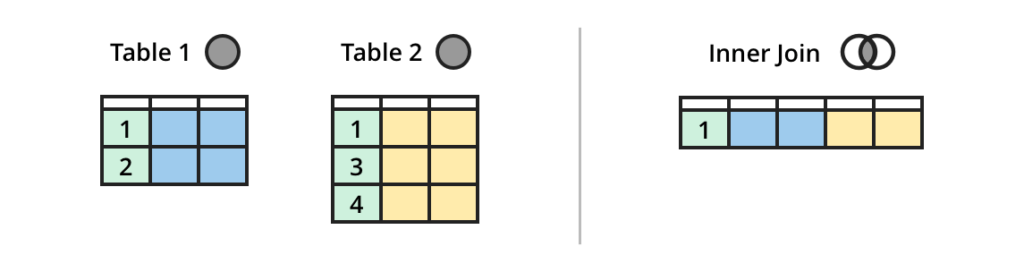
Source: atlassian.com
Syntax:
SELECT column_list
FROM table1
INNER JOIN table2 ON table1.column_name = table2.column_name;
INNER JOIN Example:
Retrieve the name of each customer and the order_date for all orders they have placed. Only customers who have placed orders will appear.
§3
LEFT JOIN (or LEFT OUTER JOIN)
#
A LEFT JOIN returns all rows from the left table (the first table in the FROM clause) and the matching rows from the right table. If there is no match for a row in the left table, the columns from the right table will contain NULL values.

Source: atlassian.com
Syntax:
SELECT column_list
FROM table1
LEFT JOIN table2 ON table1.column_name = table2.column_name;
LEFT OUTER JOIN is synonymous with LEFT JOIN.
LEFT JOIN Example:
List all customers and any orders they have placed. Customers without orders will still be listed, with NULL for order_date.
Full customers and orders tables:
§4
RIGHT JOIN (or RIGHT OUTER JOIN)
#
A RIGHT JOIN returns all rows from the right table (the second table in the FROM clause) and the matching rows from the left table. If there is no match for a row in the right table, the columns from the left table will contain NULL values.
This is simply the inverse of a LEFT JOIN.
Syntax:
SELECT column_list
FROM table1
RIGHT JOIN table2 ON table1.column_name = table2.column_name;
RIGHT OUTER JOIN is synonymous with RIGHT JOIN.
RIGHT JOIN Example:
List all orders and the customer who placed them. If an order somehow exists without a valid customer_id (e.g., data inconsistency), it would still be listed with NULL for customer_name.
§5
FULL JOIN (or FULL OUTER JOIN)
#
A FULL JOIN returns all rows when there is a match in either the left or the right table. It combines the results of both LEFT JOIN and RIGHT JOIN. If a row in the left table has no match in the right, the right-side columns are NULL. Conversely, if a row in the right table has no match in the left, the left-side columns are NULL.
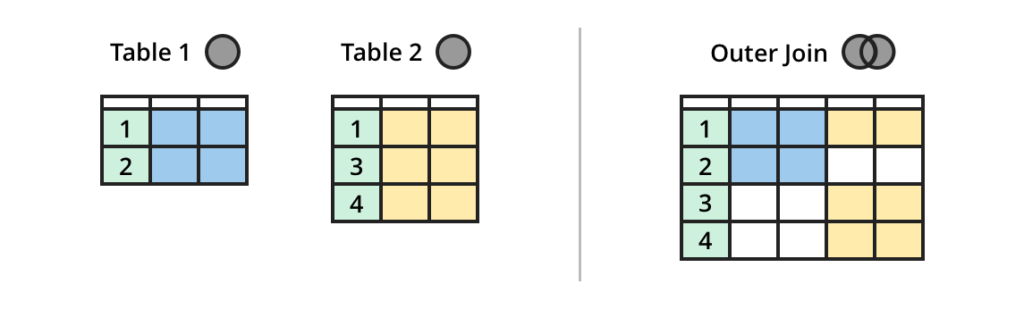
Source: atlassian.com
Syntax:
SELECT column_list
FROM table1
FULL JOIN table2 ON table1.column_name = table2.column_name;
FULL OUTER JOIN is synonymous with FULL JOIN.
Note: FULL JOIN is not supported by all database management systems (DBMS), notably MySQL and SQLite. In such cases, you can often achieve a similar result by combining a LEFT JOIN and a RIGHT JOIN with a UNION.
FULL JOIN Example:
If SQLite supported FULL JOIN, this query would show all customers and all orders, linking them where possible, and showing NULL for unmatched sides. This query is supported in Postgres.
-- not runnable in SQLite directly for FULL JOIN
SELECT
    c.name AS customer_name,
    o.order_date
FROM customers AS c
FULL JOIN
    orders AS o ON c.id = o.customer_id
ORDER BY c.name, o.order_date;
§6 Self-Joins #
A self-join is a join in which a table is joined to itself. This is useful when you need to compare rows within the same table. To perform a self-join, you must use table aliases to distinguish between the two instances of the table.
Syntax:
SELECT a.column_name, b.column_name
FROM table_name AS a, table_name AS b
WHERE a.common_column = b.common_column
  AND a.id <> b.id; -- used to avoid joining a row to itself
Or with explicit JOIN syntax:
SELECT a.column_name, b.column_name
FROM table_name AS a
JOIN table_name AS b ON a.common_column = b.common_column
WHERE a.id <> b.id;
Self-Join Example:
Imagine a products table with id, name, category_id, and a categories table with id and name. You could self-join products to find products within the same category and then join with categories to display the category name. Effectively creating product pairings with other products from the same category.
Full categories & products tables:
§7 Cross-Joins #
A cross-join produces a Cartesian product of the two tables involved. This means that every row from the first table is combined with every row from the second table. The result set will contain (number of rows in table1) * (number of rows in table2) rows. Cross-joins are typically used when you want to generate all possible combinations of rows between two tables, such as for generating test data or for specific statistical analyses.
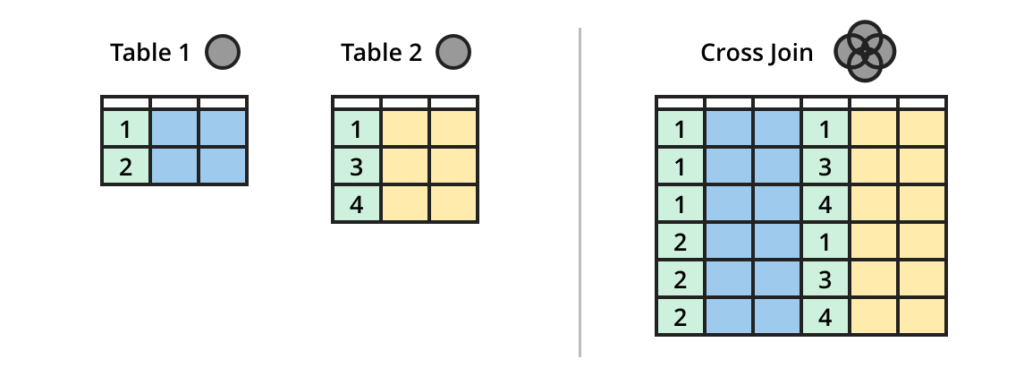
Source: atlassian.com
Syntax:
SELECT table1.column_name, table2.column_name
FROM table1
CROSS JOIN table2;
Or implicitly (without the CROSS JOIN keyword, but using a comma-separated list of tables in the FROM clause without a WHERE clause):
SELECT table1.column_name, table2.column_name
FROM table1, table2;
Cross-Join Example:
Imagine a colors table and a sizes table. A cross-join could be used to generate all possible combinations of colors and sizes for a product.
(Using a simplified products table and categories table for demonstration, showing every product combined with every category.)
SELECT
    p.name AS ProductName,
    c.name AS CategoryName
FROM
    products AS p
CROSS JOIN
    categories AS c
ORDER BY
    ProductName, CategoryName;
§8
UNION and UNION ALL
#
UNION and UNION ALL are set operators used to combine the result sets of two or more SELECT statements into a single result set.
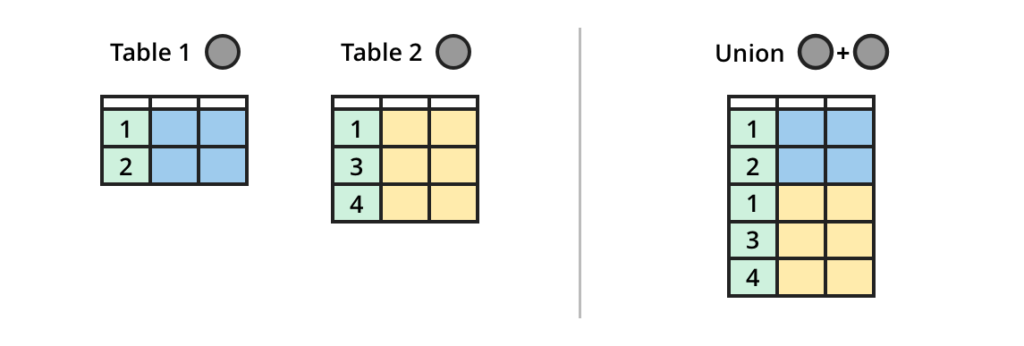
Source: atlassian.com
Requirements for UNION and UNION ALL:
- Each
SELECTstatement within theUNIONmust have the same number of columns. - The columns must have compatible data types (e.g.,
INTwithINT,TEXTwithTEXT). - The order of the columns in each
SELECTstatement must be the same.
UNION:
Combines the result sets and removes duplicate rows.
Syntax:
SELECT column1, column2 FROM table1
UNION
SELECT column1, column2 FROM table2;
UNION ALL:
Combines the result sets and includes all duplicate rows. This is generally faster than UNION because it doesn’t perform the overhead of checking for and removing duplicates.
Syntax:
SELECT column1, column2 FROM table1
UNION ALL
SELECT column1, column2 FROM table2;
UNION vs. UNION ALL Example:
Combine customer names and product names.
UNION (removes duplicates if a customer name matches a product name):
UNION ALL (includes all names, even if duplicates exist):
There is a
customernamedWidget Ain thecustomerstable for the sake of this example.
§8.1
Using UNION to simulate FULL JOIN
#
MySQL and SQLite do not support the FULL JOIN statement, It can be re-created by using a UNION statement.
FULL JOIN using UNION example:
Combine customer names and their order dates, including customers without orders and orders without a matching customer.
§9
SQL JOIN Visualizations
#
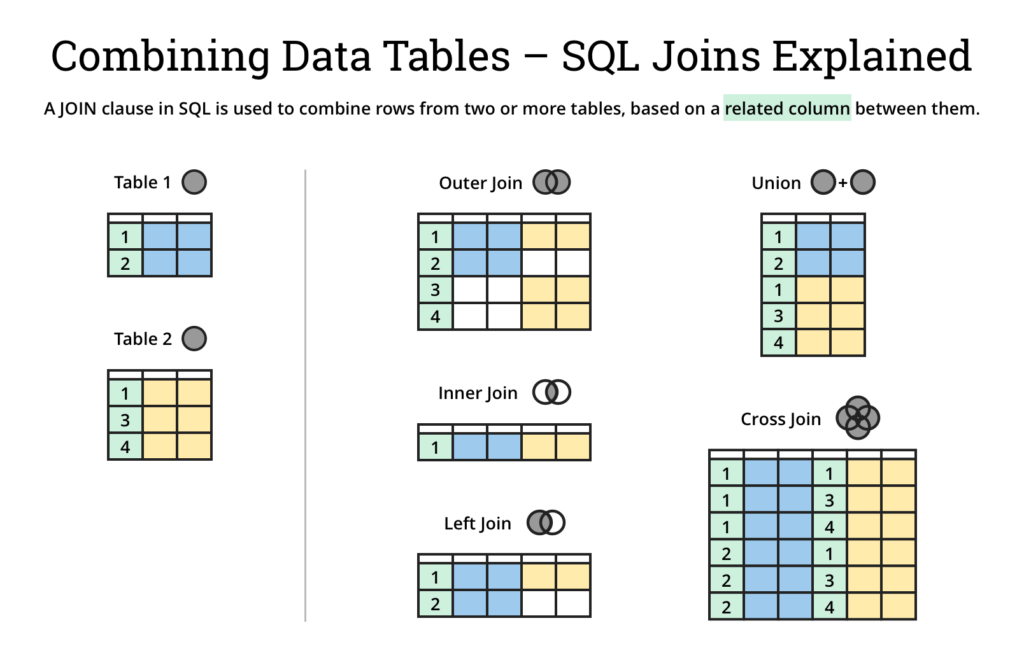
Source: atlassian.com
§10 More Resources #
- https://www.atlassian.com/data/sql/sql-join-types-explained-visually
- https://www.postgresql.org/docs/current/tutorial-join.html
- https://www.postgresql.org/docs/current/queries-union.html
- https://mode.com/sql-tutorial/sql-joins
- https://sqlbolt.com/lesson/select_queries_with_joins
§11 Questions #
Please number each response to directly correspond with the question. Provide clear, concise answers that fully address each question without unnecessary elaboration or essay-style writing. Provide only the SQL query unless otherwise specified.
- What is the primary purpose of using a
JOINin SQL?
- Which type of join returns only the rows that have matching values in both tables?
- Explain what happens to columns from the right table in a
LEFT JOINif there is no match for a row in the left table.
- True or False:
LEFT JOINandLEFT OUTER JOINare different types of joins.
- Which join type returns all rows from both tables, filling in
NULLs where there are no matches?
- When would you use a self-join?
- What are the two main requirements for
SELECTstatements to be combined usingUNIONorUNION ALL?
- What is the key difference between
UNIONandUNION ALL?
- What is the purpose of the AS keyword in SQL, especially when used with
JOINs?
- Which type of join would you use to find all possible combinations of rows between two tables?
- In a
RIGHT JOIN, if there is no match for a row in the right table, what values will the columns from the left table contain?
- Why is
UNION ALLgenerally faster thanUNION?
- Which database management systems (DBMS) do not directly support
FULL JOIN?
- How can you simulate a
FULL JOINin DBMS’s that do not support it directly?
- When performing a self-join, why is it important to use table aliases?
- If you have a products table and a categories table, and you want to list all products along with their category names, but only if a category is assigned to the product, which type of join would be most appropriate?
The remaining questions will use the database below, use the text box to test queries for the questions.
For these questions, I do not want the SQL outputs, only the SQL query.
Use the (view schema) link to view the list of tables and their structure.
- Write a query that lists all product names along with their category names, do not return any NULL values.
- Write a query that lists all customers and the
order_idof any orders they have placed. Include customers who have not placed any orders.
- Write a query that lists all customers and the
order_idof any orders they have placed. Only include customers who have placed any orders.
- Write a query that finds all orders and the name of the customer who placed each order, return only the order id and customer name.
- Write a query that combines the names of all customers and all products into a single list, do not remove duplicate names.
- Write a query that lists all products and their
unit_price, along with theqtyfromorder_itemsfor any times they were ordered. Include products that have never been ordered.
- Write a query that lists all customers who have placed an order with a ‘NEW’ status. Display
customer_idandcustomer_name.
- Write a query to find products that have the same
unit_pricebut differentids. Display thenameandunit_priceof both products on a single line.
- Write a query that lists the
order_id,product_name, andqtyfor all items in orders placed by the customer named ‘Alice Smith’.
- Write a query that finds all orders that include a product from the ‘Electronics’ category. Display the
order_id, the customer name, and theproduct_name.